 Hormuz Labs
 AgentShot · video
Give notes. Get cuts.
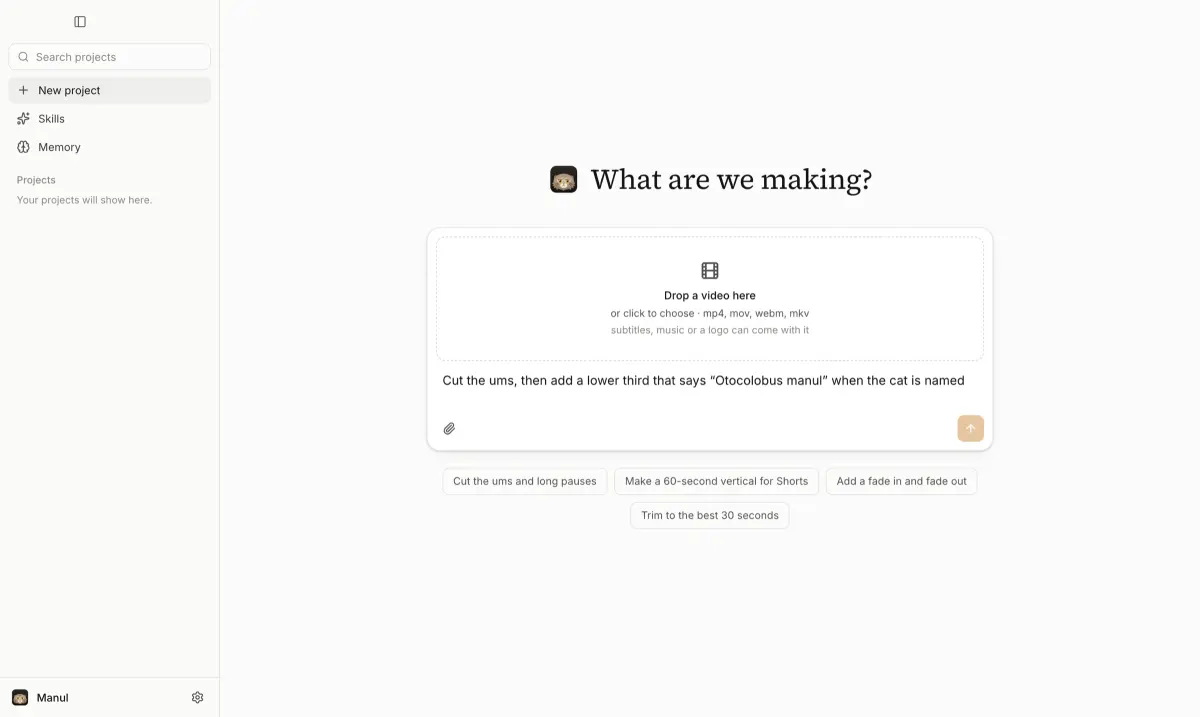
The video editor you talk to. Say what you want, point at the frame, keep or send back every edit.
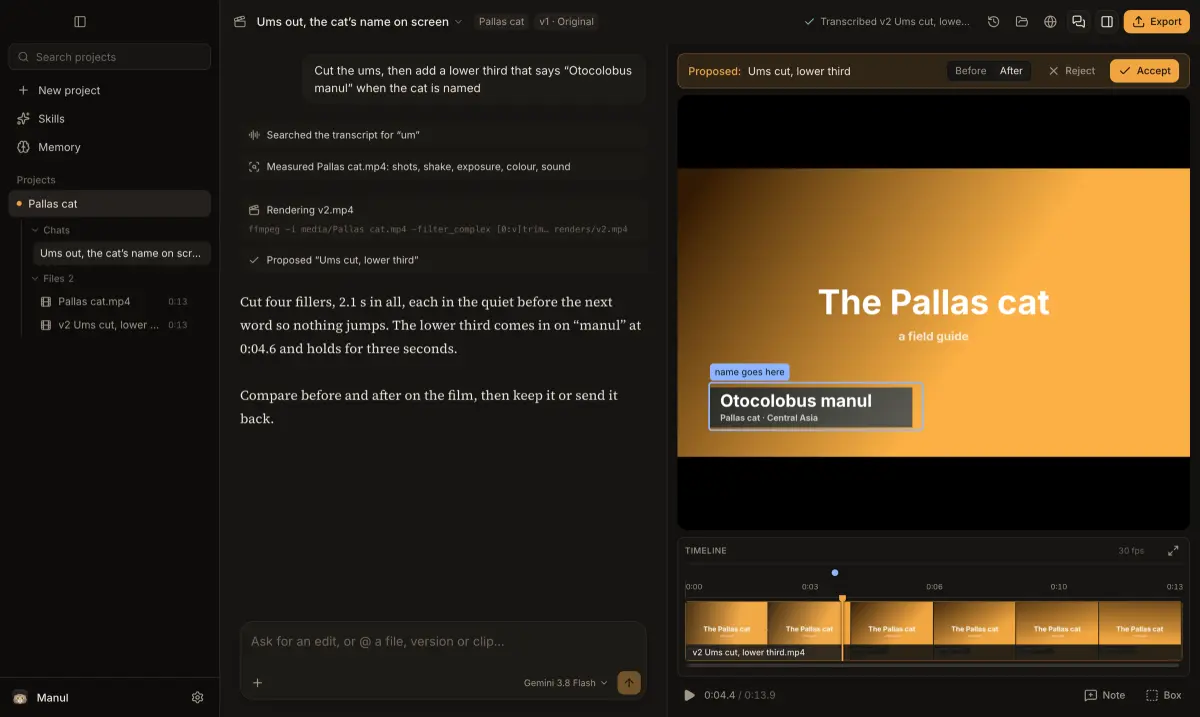
Drop in your footage, say what you want, and point at the frame when something's off. AgentShot makes the cut on your own computer and shows you a before / after of every change. You never have to touch a timeline.
$brew install hormuz-labs/tap/manul
- macOS
- Windows 10 / 11
- Debian / Ubuntu
- Linux AppImage
- iOS & Android companion
- v0.4.15 · GPLv3
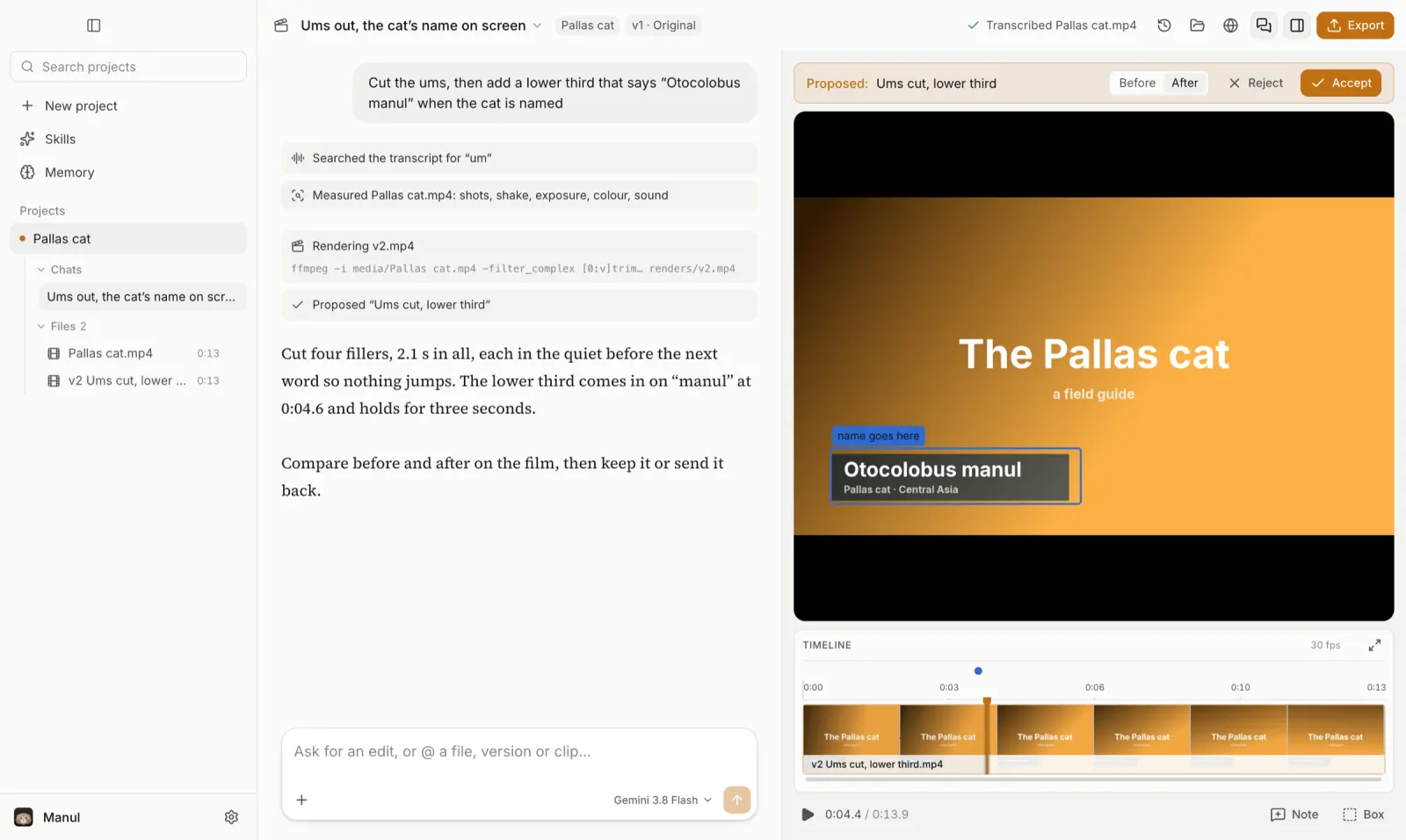
Three steps, no timeline.
- DropFootage, a folder, a zip, or nothing at all: start from an example or have your product filmed.
- Point & sayBox the frame, drag across the timeline, or just type. "Cut the ums." "Blur this." "Name on screen here."
- Keep or send backEvery edit is a proposal you scrub before and after. Nothing is ever overwritten.
Why it's different
Video editors make you operate them. AI video tools take your footage away and hand back whatever they made. AgentShot works the way a director works with a good editor in the room.
- You point. It edits.Draw a box around a number plate that needs blurring. Drag across the sentence that drags on. Click the one word in a title that's wrong. Your note sits on that exact spot and moment.
- It proposes. You decide.Every edit arrives as a new version you can scrub before and after, then keep or send back with a reply. Every version you ever kept is one click away.
- Your pixels stay real.AgentShot cuts your footage and never swaps your shots for generated ones. Titles and captions are real typography you can still drag around.
- Your footage stays home.No upload queue, no cloud project, no render farm. Editing and transcription run on your computer; the AI only sees text and still frames.
Point, then say it.
Draw a box on the picture (B), drag across the timeline, or press N at a moment, and a message box opens right there: say what should change and press return.
Your projects live in the sidebar, each opened up into its chats and files. Click a file to attach it to your next message, or drag footage onto the timeline to put it in the film.
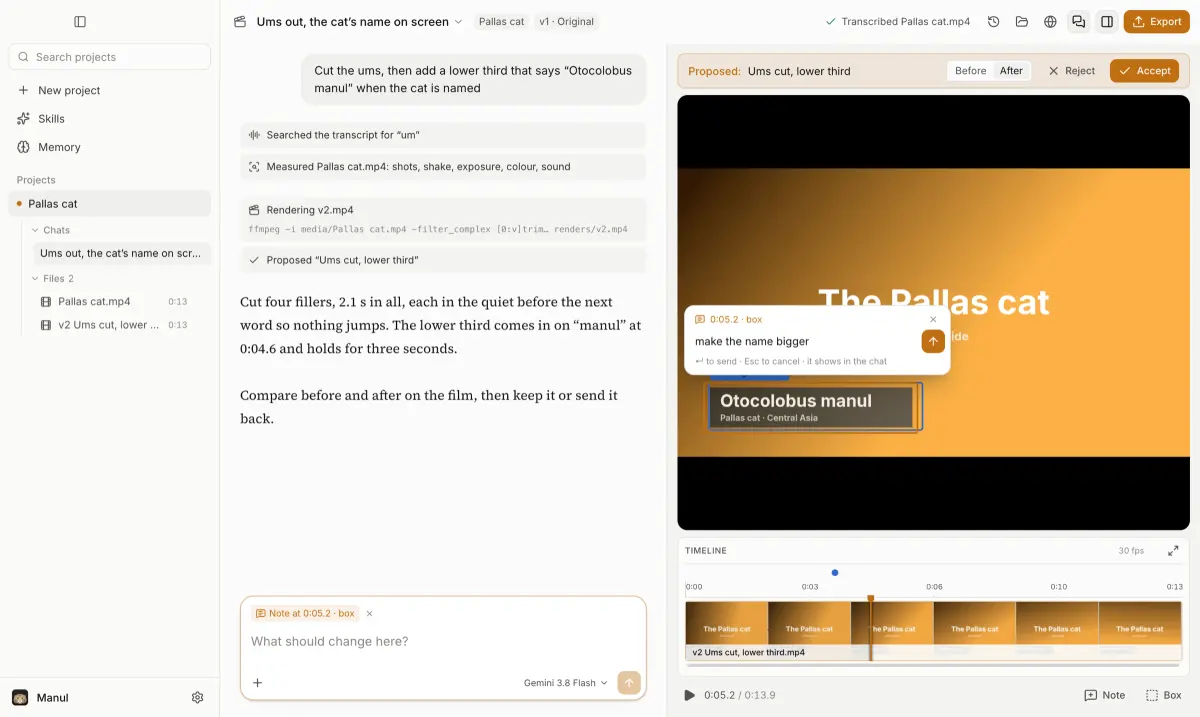
Youcut the ums, and the bit where I lose my train of thought
AgentShotCut 9 fillers and the restart at 0:42. 2:31 → 2:12. Before / after ready: keep or send back.
You(draws a box over a parked car, 0:18–0:24) blur this number plate
AgentShotBlurred that box from 0:18 to 0:24. The rest of the shot is untouched.
Younow a vertical one for Shorts, captions burned in
What's in the box
- Word-accurate cutsEvery spoken word is transcribed with its timing, and each cut point moves into the quiet between words, so "cut the ums" or "drop the second take" lands on the exact word.
- It watches the whole film firstWho speaks when, every shot, camera shake, exposure, frozen and black frames, faces, loudness and pauses, and the music's tempo and drops, all measured on your computer.
- Titles it designsTitle cards, lower thirds, callouts, charts and animated text, timed to your film. Drag, resize or retype any word on the picture afterwards.
- A mix you hear liveMusic loops to the length of your film and ducks under speech, and you hear the mix as the film plays, before anything renders.
- One film, every shape16:9 for YouTube, 9:16 for Shorts, Reels and TikTok, 1:1 for feeds. The crop follows whoever is in frame; captions go in burned or as a file.
- Your files, put to useDrop in subtitles, music, your logo, fonts and LUTs, or a whole folder or zip. AgentShot says what each one is and the edit uses them.
- Point at anything by nameType @ and pick a file, a version you kept or a title AgentShot made: "put @logo.png bottom right and @song.mp3 under the intro".
- Its own browserIt looks up references and finds footage in a browser of its own, never yours, unless you switch that on.
- A memory for tasteSay "captions are always yellow" once and every project after knows it. It also knows how talking heads, tutorials, Shorts, promos and montages are cut.
- Any model, every filmOpen projects keep working in the background. Claude, Gemini or GPT, or any OpenAI- or Anthropic-compatible endpoint, picked per project.
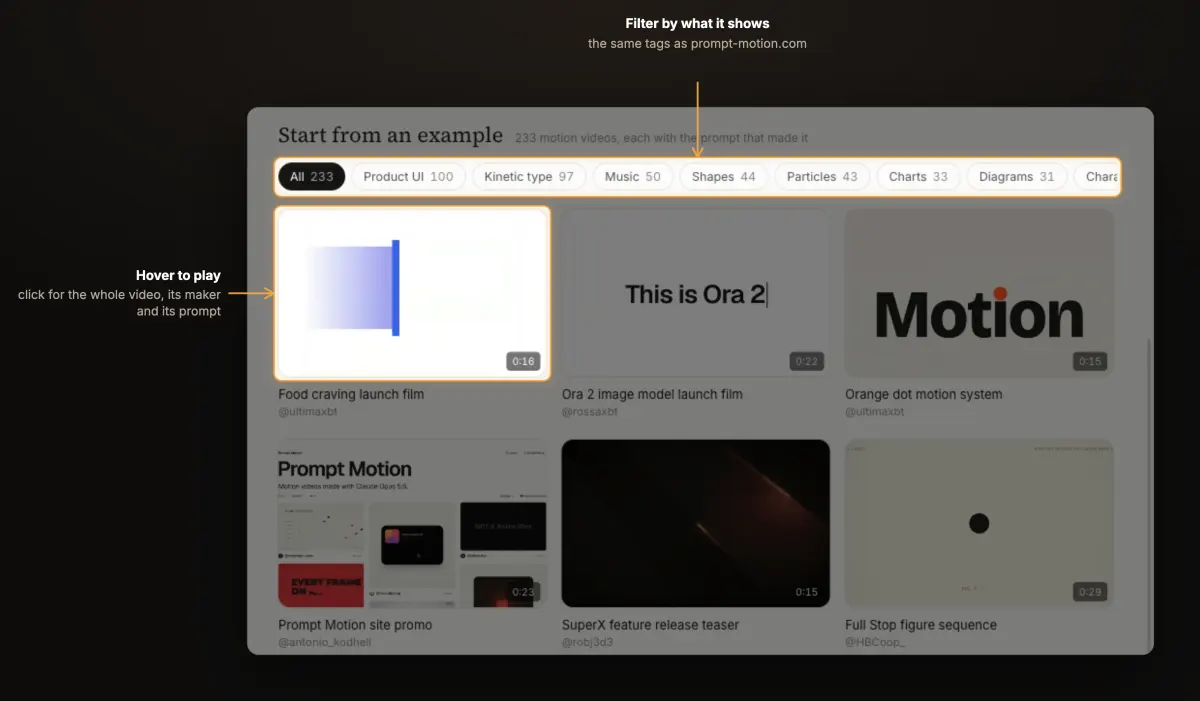
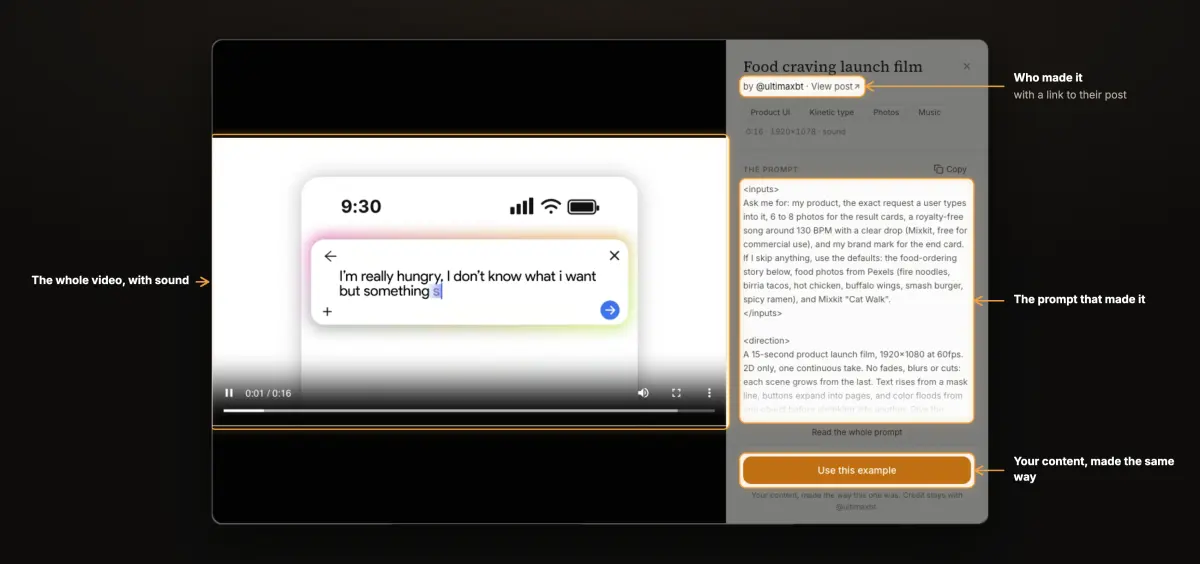
No footage? Start from an example, or have it filmed.
Your phone, from anywhere.
- Scan onceTurn on Settings → Mobile and AgentShot shows a QR code. Scan it with the companion app and you're paired, pinned to your computer's certificate.
- Direct on the goShoot and send clips, ask for edits, draw boxes on the frame, review before / after proposals and share the export, all from your phone.
- Heavy lifting elsewhereHand renders and agent edits to a Cloud Worker, or your own workstation running
manul --worker. Projects sync peer to peer.
Away from home, phone and computer meet over AgentShot's own private, end-to-end encrypted mesh: no VPN install, no IP addresses, no port forwarding. Pairing from anywhere is on Android today; iOS pairs on the same Wi-Fi.
Light or dark, your call.
Get AgentShot
AgentShot is in early days: expect rough edges, and please open an issue when you hit one.
One line in Terminal. No Homebrew yet? Install it from brew.sh first.
$brew install hormuz-labs/tap/manul
Download AgentShot-windows-x64-Setup.exe from the latest release: one offline installer, no developer tools needed, updates itself inside the app.
Add the signed apt repository once and apt keeps AgentShot up to date.
curl -fsSL https://apt.agentshot.si/manul.gpg | sudo gpg --batch --yes --dearmor -o /usr/share/keyrings/manul.gpg &&
echo "deb [signed-by=/usr/share/keyrings/manul.gpg] https://apt.agentshot.si stable main" | sudo tee /etc/apt/sources.list.d/manul.list &&
sudo apt update && sudo apt install manul
The AppImage from the latest release.
The companion app, in the repository's mobile/ folder.
Where it's going
Directing by talking and pointing, titles, music, every export shape, the mobile companion with pairing from anywhere, cloud and home workers.
Hand the cut to Premiere, Resolve or Final Cut · publish straight to YouTube · generated b-roll where asked.
Clients leave notes on the frame · shared brand kits and skills · teams.
Questions
Is it really free?
Yes. AgentShot is free and open source under the GNU GPL v3 (or later): use it, change it, ship it, edit paid work with it. The AI it talks to is yours to choose: sign in for an AgentShot key (new accounts start with 1,000 credits) or bring your own Claude, Gemini or OpenAI key.
Does my footage get uploaded?
No. There is no upload queue and no cloud project. The editing and even the transcription run on your computer. The AI model only ever sees text and still frames.
Will it replace my shots with generated video?
No. AgentShot cuts your footage. Generated b-roll is on the roadmap, but only where you ask for it, and labelled as generated. Titles, lower thirds and captions are real typography, drawn frame-perfect.
What if I don't like an edit?
Every edit is a proposal. Scrub before and after, then keep it or send it back with a reply. Nothing is overwritten, and every version you ever kept is one click away. ⌘Z takes any change back.
Why is the Homebrew formula called "manul"?
Manul was AgentShot's first name, after the Pallas's cat: small, patient and unbothered by anything. The formula, the apt package and the command line kept the old name.
What does it send home?
On first run AgentShot asks whether to send crash reports and usage statistics. Both start unticked. It never sends your footage, file or project names, prompts, transcripts or keys.
Your next cut is a sentence away.
Free and open source, forever. More on agentshot.si.